Anyone who cares about front-end performance eventually runs into the problem of long Waiting (TTFB) time while optimizing a site. On an unoptimized WordPress site, TTFB often takes longer than the actual page download, which means users spend time waiting before the browser even starts receiving meaningful content. The main causes are usually on the server side. For people who are not comfortable with server operations, it can be hard to know where to start, so in this article we will break down the causes of long TTFB and the most practical ways to improve it.
What Waiting (TTFB) means
TTFB stands for Time to First Byte. It is the amount of time between the browser sending a request and the browser receiving the first byte of the response. In practice, that includes server processing time and sometimes redirect time as well. It is one of the most useful indicators of server response speed.
A simple analogy is asking a friend a question. The time your friend spends thinking before answering is like TTFB. The shorter that delay is, the faster the response feels. The same thing applies to a server.
How long is “too long” for TTFB?
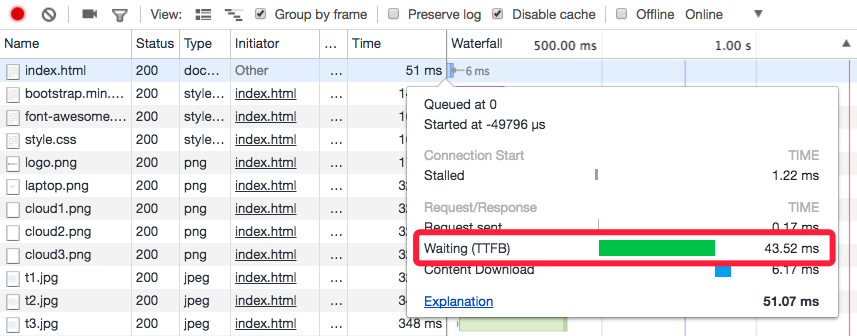
Every server is different, so there is no single TTFB number that fits every environment. If you want to know what your own server is capable of, a good test is to upload a few static HTML pages and measure their TTFB. On many servers, a static page can respond in under 50 ms, and that gives you a rough idea of the best-case target for optimization.
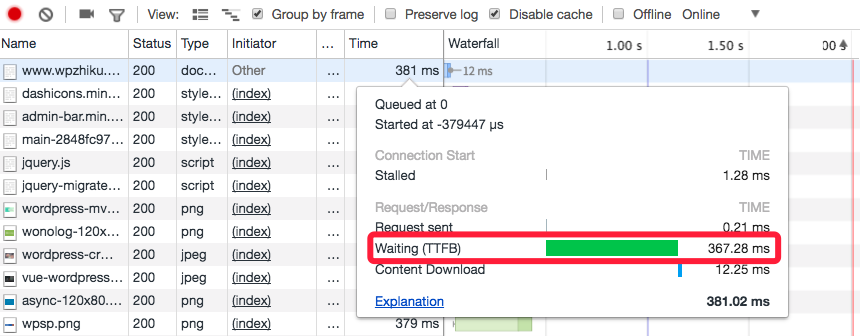
Based on our own testing, once TTFB goes above roughly 500 ms, users begin to feel a noticeable delay when opening the page. It is reasonable to treat 500 ms and above as “too long.”
Why TTFB becomes too long
For a dynamic page, once the server receives the request it still has to query the database, load the data needed by the page, pass that data into the template system, render the template, and only then begin sending the response. That work takes time, and until it is finished the browser is simply waiting. If the server is slow or badly optimized, that waiting time grows.
Network distance can also contribute. If the server is in Europe and the user is in China, for example, the request itself has a long way to travel. That extra latency can make TTFB noticeably worse even if the server is otherwise configured well.
Another less obvious factor is cookies. If the browser stores too many cookies for the site, every request sends them back to the server, and the server must parse them. That overhead can also contribute to a longer TTFB.
How to reduce long Waiting (TTFB) time
Once the causes are clear, the remedies follow naturally. The main goal is to reduce server response time. The most direct and effective way to do that on a WordPress site is caching. Some caching plugins store SQL query results so that dozens of repeated database queries are reduced to just a few. Other plugins go further and save the entire generated page as a static file or memory object.
If the problem is network-related, switching to a server closer to the audience is usually the most direct fix. If changing servers is not practical, using a CDN to replicate the page closer to users is also a strong option.
If the issue is cookie-related, then the solution is to remove unnecessary cookies, shrink the size of existing cookies, or shorten their lifetime so the browser does not send as much extra data with every request.
On this site we use the Cachify plugin with Memcached so requested pages are cached in memory directly. That brought our TTFB down to around 50 ms. If you want to inspect a live site’s TTFB yourself, browser developer tools make it easy to see.
And if you do not want to tune the server yourself, site speed optimization can absolutely be offered as a service. For many site owners, the business value of a faster site is worth paying for.