Like other PHP programs, WordPress has requirements for PHP and MySQL versions. These requirements are mainly divided into core PHP version requirements, theme PHP version requirements, and plugin PHP version requirements. As WordPress upgrades, its requirements for server components also become higher.
PHP and MySQL Version Requirements for WordPress Core
According to WordPress’s official hosting environment requirements, WordPress recommends a hosting environment that meets the following requirements:
- PHP 7.3 or higher
- MySQL 5.6 or higher, MariaDB 10.0 or higher
- HTTPS support
Apache or Nginx are the healthiest and most feature-rich servers for running WordPress, but any web server that supports PHP and MySQL is also fine.
PHP and MySQL Version Requirements for WordPress Themes
There are thousands of WordPress theme developers, and each theme’s PHP version requirement varies. Currently, WordPress doesn’t provide a method to determine a theme’s PHP requirements. Some themes list PHP requirements in their readme.txt file; you can try looking in that file. If not found, you can ask the theme developer in their support forum.
PHP and MySQL Version Requirements for WordPress Plugins
Unlike themes, WordPress already directly lists a plugin’s PHP requirements in the official plugin directory. We can check them in the plugin metadata on the right side of the plugin’s introduction page, as shown below:
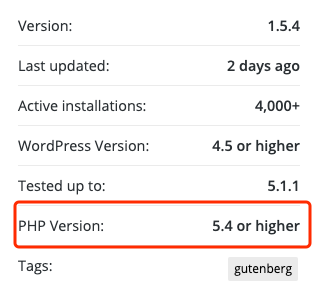
To prevent fatal errors caused by PHP versions not meeting requirements, some plugins will check the server’s PHP version when the plugin is activated to determine whether to enable plugin features.
Regarding theme and plugin requirements for MySQL version, there’s currently no relatively direct judgment method. However, compared to PHP, the differences between MySQL versions are not too large and generally won’t lead to a site failing to run due to version requirements not being met.
How to Determine Server-provided PHP and MySQL Versions
Consult Your Hosting Provider Directly
If you’re unsure about the PHP and MySQL versions provided by your web server, WordPress provides a simple question to help you ask your hosting provider. You can directly copy the content below to consult your host.
I need to run the latest version of WordPress on our server, and I’d like to know if my server supports the following:
1. PHP 7.3 or higher
2. MySQL 5.6 or higher, MariaDB 10.0 or higher
3. HTTPS support
4. Nginx or Apache with mod_rewrite enabled for URL Rewrite functionality
View in phpMyAdmin
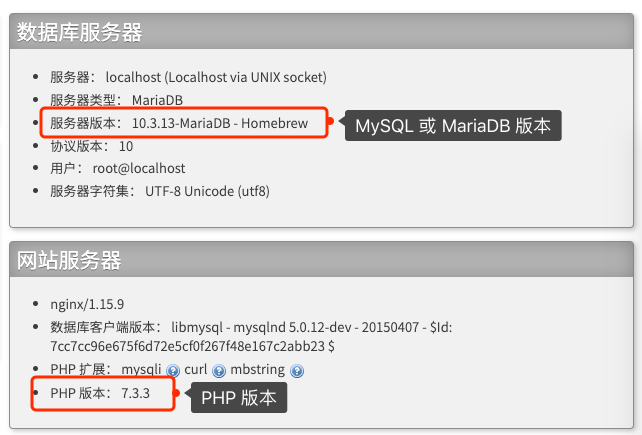
If your host provides phpMyAdmin, we can also check PHP and MySQL version information there. On the phpMyAdmin dashboard home page, you can find it as shown below.
Updating PHP and MySQL or MariaDB Promptly
Although lower PHP or MySQL versions can also run WordPress, for security’s sake, it’s recommended that friends with the means upgrade to the latest versions promptly. At the same time, new versions will also bring feature enhancements and performance improvements. If you’re worried about bugs in the newest version, you can upgrade to the previous stable version and keep an eye on PHP or MySQL version support information.