Action Scheduler is a specialized library used to trigger WordPress hooks at a specific time in the future (or as soon as possible in an asynchronous environment). Each hook can be scheduled with a unique data set, allowing your callbacks to perform operations on that specific data. Hooks can even be scheduled to run across one or multiple occurrences.
You can think of it as an extension to do_action(), adding the ability to delay and repeat hooks reliably.
Crucially, this functionality provides a powerful background processing tool for handling large task queues in WordPress. By adding logging and a management interface, it also offers complete traceability for all your background tasks.
Proven Background Processing
Every month, Action Scheduler processes millions of subscription payments, WooCommerce webhooks, and a wide array of emails and events for various other plugins.
On production websites, it has been proven to handle queues exceeding 50,000 tasks, executing resource-intensive operations like payment processing and order creation at speeds of over 10,000 operations per hour across 10 concurrent queues—all without negatively impacting normal site operations.
All of this is achieved on the existing infrastructure and WordPress site, independently of the plugin author’s control.
Action Scheduler is designed specifically for distribution within WordPress plugins (and themes) without requiring server-level access. If your plugin needs background processing—especially for high-volume batch tasks—Action Scheduler is here to help.
How Action Scheduler Works
Action Scheduler stores the hook name, parameters, and scheduled date of the action to be triggered in the future.
The scheduler attempts to run once every minute by attaching itself as a callback to the action_scheduler_run_schedule hook, which uses the built-in WordPress WP-Cron system for scheduling. It also checks for pending actions on the shutdown hook of WP Admin requests; if any are found, it starts the queue via an asynchronous loop request.
When triggered, Action Scheduler checks for actions scheduled to run at or before the current time. Asynchronous scheduled actions (unscheduled actions) have a zero date, meaning they are always considered “due” whenever a check occurs.
Batch Processing Background Jobs
If there are pending actions, Action Scheduler will claim a batch of 25 operations and begin processing them. The generated PHP process will continue processing batches of 25 until it has used 90% of available memory or has been processing for 30 seconds.
At this point, if more actions remain to be processed, it will fire an asynchronous loop request to the site to continue processing actions in a new request.
This process and loop requests continue until all pending actions have been processed.
Daily Maintenance
Before processing a batch, the scheduler deletes any claims older than five minutes (specifically, 10 times the allowed time limit, which defaults to 30 seconds).
Action Scheduler also deletes any actions that were completed or canceled more than one month ago.
If an action runs for longer than 5 minutes, Action Scheduler assumes it has timed out and marks it as failed. However, if all callbacks attached to that action successfully complete after the timeout, its status will be updated to completed accordingly.
How to Use Action Scheduler
You can install this library as a plugin, or directly bundle it as a library within your theme or plugin. Once installed, you can begin arranging and executing task plans.
Scheduling a Task
In the code below, we use the eg_midnight_log hook to schedule an operation to run at midnight every day. When this operation runs, the function hooked to eg_midnight_log will be executed.
function eg_schedule_midnight_log() {
    if ( false === as_has_scheduled_action( 'eg_midnight_log' ) ) {
        as_schedule_recurring_action( strtotime( 'tomorrow' ), DAY_IN_SECONDS, 'eg_midnight_log', array(), '', true );
    }
}
add_action( 'init', 'eg_schedule_midnight_log' );

function eg_log_action_data() {
    error_log( 'It is just after midnight on ' . date( 'Y-m-d' ) );
}
add_action( 'eg_midnight_log', 'eg_log_action_data' );
Passing Parameters
If you need to pass parameters to the callback function, you must pass them as an array when adding the task plan. Additionally, the function executing the action must be configured to accept the same number of parameters from the array.
add_action( 'purchase_notification', 'send_purchase_notification', 10, 2 );

as_schedule_single_action( time(), 'purchase_notification', array(
    'bob@foo.bar',
    'Learning Action Scheduler (e-book)',
) );

function send_purchase_notification( $customer_email, $purchased_item ) {
    wp_mail(
        $customer_email,
        'Thank you!',
        "You purchased $purchased_item successfully."
    );
}
Traceable Background Processing
Did your background jobs run correctly? With Action Scheduler’s built-in logging, you no longer have to guess. Every event for every action is logged in the actionscheduler_logs table and displayed in the management interface.
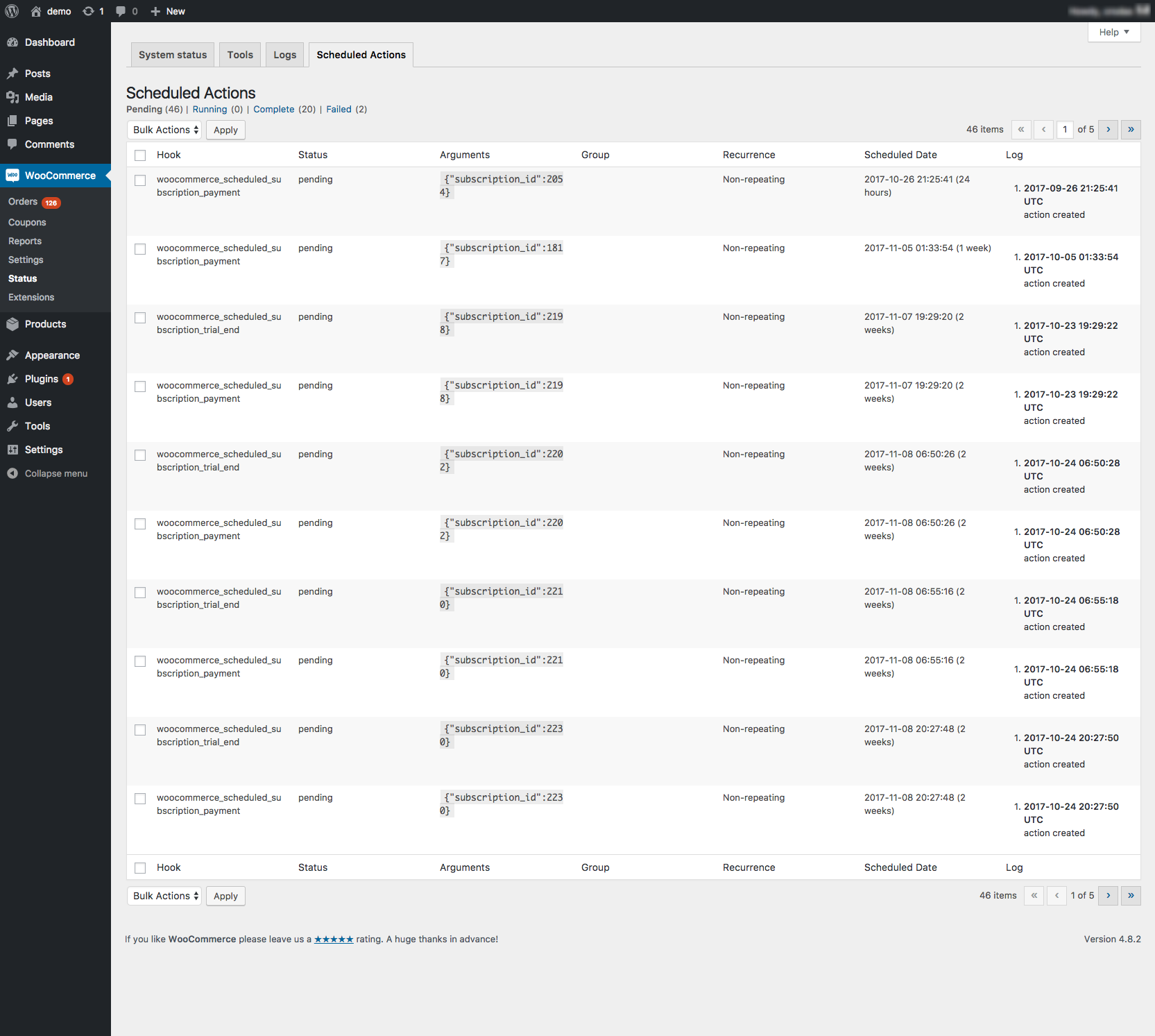
By default, the following events are logged:
- When an action is created.
- When an action begins (including details on how it was run, e.g., via WP-CLI or WP-Cron).
- When an action completes.
- When an action fails.
If an action fails due to an error, you can view the specific logs recorded in the error log within the management interface, allowing you to track errors that occur on sites where you may not have direct access.