A normal WordPress site mainly consists of the following three parts:
- The installed WordPress core files.
- The themes, plugins, and uploaded media stored in the
wp-contentdirectory. - The database, which stores everything we add through the WordPress dashboard.
Many WordPress users may never have paid attention to the WordPress database, and may not even realize that the posts and pages they publish, the comments on the site, and the menus they create in the dashboard are all stored in the WordPress database. When users visit the site, WordPress reads the content from the database, fills it into the theme we are using, and then returns the final page to the visitor.
In this article, I will help everyone understand the different parts of the WordPress database in more detail. The article includes the following sections.
- Introduction
- Relationships between data
- Content types
- User data
- Metadata
- Custom taxonomies, categories, tags, and custom taxonomy terms
- A comparison between custom taxonomies and post metadata
- The options table
- Multisite data
Through this article, we can understand which tables different kinds of WordPress content are stored in, and how the different types of data are connected.
Before looking at the tables, it helps to understand the types of content stored in WordPress. In WordPress, there are the following content types:
- Posts
- Pages
- Custom post types
- Attachments
- Links
- Navigation menu items, which are stored as posts in the database
The content types above also have some associated data:
- Categories
- Tags
- Custom taxonomies and terms
- Post metadata
Besides those, WordPress also contains some other kinds of data:
- Widgets
- Options
- Users
- Sites, in a multisite installation
- Hard-coded content added in themes or plugins
- Data pulled in from external services
All of the content types above are stored somewhere in the database.
Some of them are complete data records on their own, some are only one part of another data structure, and some link to records in other tables. For example, data about a post can be linked to data about a user, which is how WordPress knows which author published a post.
WordPress database structure
WordPress uses related database tables to minimize the amount of duplicated data it stores, which creates one-to-many relationships. In other words, one user can have many posts. If we want to know which author published a particular post, WordPress only needs to store the author ID on that post. This design saves database space and also gives WordPress a great deal of flexibility. We can change user data without having to modify posts that were published earlier.
The chart below is reproduced from official WordPress documentation, and it gives a very clear overview of how the tables are connected.
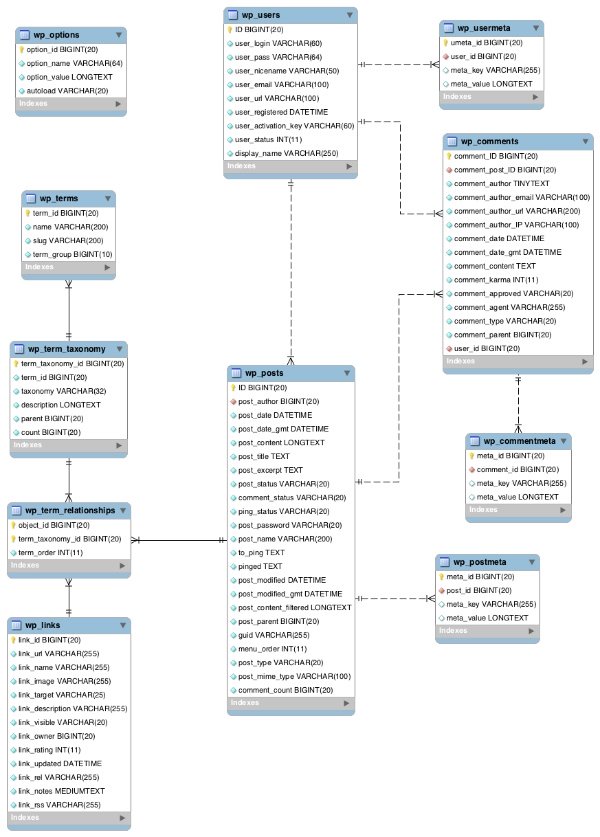
Most tables are linked to one or more other tables through a field that usually contains the unique identifier for a record, in other words an ID, such as the post_id for a post. Those relationships are shown below:
| Table | Stored data | Related to |
|---|---|---|
wp_posts |
Posts, pages, attachments, revisions, navigation menu items | wp_postmeta via post_idwp_term_relationships via post_id |
wp_postmeta |
Metadata for each post | wp_posts via post_id |
wp_comments |
Comments | wp_posts via post_id |
wp_commentmeta |
Comment metadata | wp_comments via comment_id |
wp_term_relationships |
Relationships between posts and taxonomies | wp_posts via post_idwp_term_taxonomy via term_taxonomy_id |
wp_term_taxonomy |
Taxonomies, including built-in categories and tags | wp_term_relationships via term_taxonomy_id |
wp_terms |
Category terms, tag terms, and custom taxonomy terms | wp_term_taxonomy via term_id |
wp_links |
Blogroll links, deprecated and usually ignorable | wp_term_relationships via link_id |
wp_users |
Users | wp_posts via post_author |
wp_user_meta |
Metadata for each user | wp_users via user_id |
wp_options |
Site settings and options, including settings saved through the dashboard, themes, or plugins | Standalone, not directly related to other tables |
Before going further, there are several important points worth noting:
- By default, the tables use a
wp_prefix, but we can change that prefix during installation or through configuration. - The most central table is
wp_posts. In most sites, it stores the largest amount of content, and it connects almost everything together. - Only one table is truly independent and not connected to the others:
wp_options. It is a key-value table that stores settings and cached data for WordPress. - There are two tables that store information about custom taxonomies. We will explain those in more detail later.
wp_usersandwp_commentsare not directly related. Even though a comment can be associated with a user, the connection is not built through a direct table relationship in the way posts are.- Multisite adds some additional tables, but that is not the focus of this article and can be discussed separately later.
Linking content to database tables
Now that we have a basic picture of WordPress content and database tables, it is time to line those things up and see which tables store which kinds of content.
| Content type | Table |
|---|---|
| Posts | wp_posts |
| Pages | wp_posts |
| Custom post types | wp_posts |
| Attachments | wp_posts |
| Links | wp_links |
| Navigation menus | wp_posts |
| Categories | wp_terms |
| Tags | wp_terms |
| Custom taxonomies | wp_term_taxonomy |
| Taxonomy terms | wp_terms |
| Post metadata | wp_post_meta |
| Widgets | wp_options |
| Settings and options | wp_options |
| Users | wp_users |
| Post body content | wp_posts if it is stored as a postwp_options if it is stored in a widgetTheme or plugin files if it is hard-coded |
| Other content | wp_posts if it is stored as a postwp_options if it is stored in a widgetTheme or plugin files if it is hard-coded |
You may notice that not every table appears in the list above. The missing tables are mostly auxiliary tables. They do not store the main content itself, but instead store information about how different pieces of data are connected.
Summary
Through this article, I hope you now have a deeper understanding of WordPress content types and how WordPress stores those data types. In the next article in this series, I will introduce the relationships between the data in more detail, and explain how the tables connect to one another.