Custom taxonomies are one of the things that make WordPress so flexible. Once they are combined with post types, WordPress can evolve from a blogging system into a full CMS. Custom taxonomies are connected to the posts tables and make WordPress’s categorization system powerful and flexible. From the perspective of database structure, the relationship between posts and custom taxonomies is many-to-many, and it is the only many-to-many relationship in the WordPress database. Let us take a closer look at how WordPress taxonomies work.
First, let us make it clear what a custom taxonomy is
What is a custom taxonomy?
A taxonomy is a system used to group and categorize things. In many cases, taxonomies are hierarchical. One well-known example in biology is Linnaean taxonomy, which is used to classify living things.
In WordPress, taxonomies are used to classify and organize post data. WordPress has two built-in taxonomies:
- Categories
- Tags
The relationship between categories and tags is a bit like the relationship between posts and pages: the underlying data type is similar, but the front-end presentation is different. Both categories and tags are taxonomies, just as posts and pages are both content types.
We can also add custom taxonomies as needed. In the admin interface, a custom taxonomy behaves much like categories or tags. Every custom taxonomy has the same status as a built-in taxonomy, and that is very similar to the relationship between custom post types and built-in post types.
Taxonomy terms
Every taxonomy can contain terms that are used to classify our data. Tags are simply terms inside the tag taxonomy. After creating a custom taxonomy, we can insert terms either through the WordPress admin area or by using the wp_insert_term() function.
When combined with custom queries, taxonomy terms become very powerful. We can create custom templates in a theme or plugin to display posts belonging to multiple terms, filter data through multiple terms, and more.
How WordPress stores custom taxonomies and taxonomy terms
As mentioned above, the relationship between posts and taxonomies is many-to-many, while the relationship between a taxonomy and its terms is one-to-many. A taxonomy can have many terms, but a term belongs to only one taxonomy. At the same time, there is also a one-to-many relationship between terms themselves, mainly to implement hierarchical terms.
wp_term_relationships: the relationship table between terms and posts.wp_term_taxonomy: stores the relationship between terms and taxonomies, as well as some of the relationship data for terms themselves.wp_terms: the terms table.
The following diagram gives a more intuitive view of how these tables relate to one another:
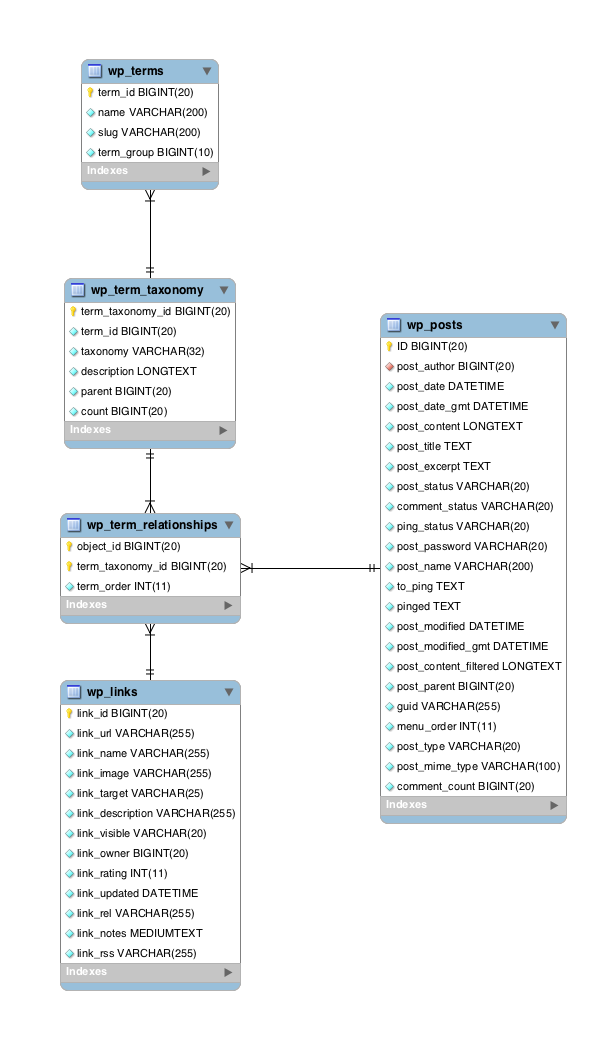
Below, let us look at the tables in the diagram and how they work.
The wp_terms table
wp_terms stores categories, tags, and terms from custom taxonomies. Each row has the following four fields:
term_id: the unique ID of the term.name: the term name.slug: the term slug.term_group: currently this field is not used by WordPress, so it can usually be ignored.
The wp_term_taxonomy table
wp_term_taxonomy stores the taxonomy that a term belongs to, as well as relationship data for the term itself. It has the following fields:
term_taxonomy_id: the record ID.term_id: the term ID, which links back to the record inwp_terms.taxonomy: the name of the taxonomy the term belongs to.description: the term description.parent: the parent term for hierarchical terms.count: the number of posts assigned to the term.
In most WordPress installs, each row in wp_terms corresponds to only one row in wp_term_taxonomy. In some special cases, though, wp_term_taxonomy can contain two terms with the same name and slug, differing only by taxonomy. That means we can output posts belonging to terms of different taxonomies even if the term names are identical.
In other words, the relationship between wp_terms and wp_term_taxonomy is one-to-many. A single term in wp_terms can link to multiple rows in wp_term_taxonomy, while each row in wp_term_taxonomy links to only one term.
The wp_term_relationships table
wp_term_relationships is the relationship table between posts and terms. Posts and terms form their many-to-many relationship through this table. It has only three fields:
object_id: links to the post ID inwp_posts.term_taxonomy_id: links to the term entry inwp_term_taxonomy.term_order: the order of terms attached to the object. This field is only used when the taxonomy was created with thesortparameter set totrue. The default value is0.
Summary
The relationship between posts and terms is very powerful. It is the only many-to-many relationship in WordPress. Understanding the relationship between taxonomies and terms, as well as how they are stored in the database, helps us understand WordPress more deeply and use related features more effectively.